Frisbii Billing for Magento 2
Frisbii for Magento 2 connects your store to Frisbii's powerful recurring revenue management platform—bringing together subscriptions, automated billing, and payments in one seamless integration.
With this extension, you can:
Sell subscription products and manage recurring payments directly from Magento
Automate invoicing, renewals, and dunning workflows
Accept all major local and international payment methods - including Dankort, VISA Dankort, Mastercard, VISA, MobilePay, ViaBill, and more
Leverage flexible billing intervals, free trials, and discount logic
Track and manage customer lifecycles with full visibility via the Frisbii platform
Whether you're running a subscription-first business or offering a mix of one-time and recurring purchases, Frisbii gives you the tools to scale your revenue and streamline operations.
Installation
Click here for the installation guide.
Click here for the user guide.
Click here for the developer documentation.
Frisbii Pay for Magento 1 and 2
The Frisbii Pay extension connects your Magento store to Frisbii’s native payment gateway—enabling seamless billing and subscription management directly within your checkout.
Accept a wide range of local and international payment methods, including Dankort, VISA Dankort, Mastercard, VISA, VISA Electron, Maestro, MobilePay, ViaBill, and Forbrugsforeningen.
Designed for businesses with recurring revenue models, Frisbii Pay helps you automate billing, manage subscriptions, and unify payments in one streamlined platform—ensuring a secure, compliant, and conversion-optimized experience for your customers across Europe and beyond.
Installation
Magento 1
Click here for the installation guide for Magento 1.
Click here for the developer documentation.
Magento 2
Click here for the installation guide for Magento 2.
Click here for the user guide.
Click here for the developer documentation.
Change your API key
Follow these steps to replace your Frisbii API key, for example after creating a new key or moving to a different Frisbii account.
In your Frisbii Admin, go to Configurations > Integrations and tools > API credentials and create a new private key.
In the Magento Admin, go to Stores > Configuration > Sales > Payment Methods > Frisbii Pay.
In the Scope switcher at the top of the page, select the store view you want to update.
Paste the new key into the right field:
Private API Key For Test for your test account
Private API Key for your live account
Click Save Config.
Check the account field below the key you changed. API Key Account For Test or API Key Account should show your Frisbii account name and ID with a green check mark.
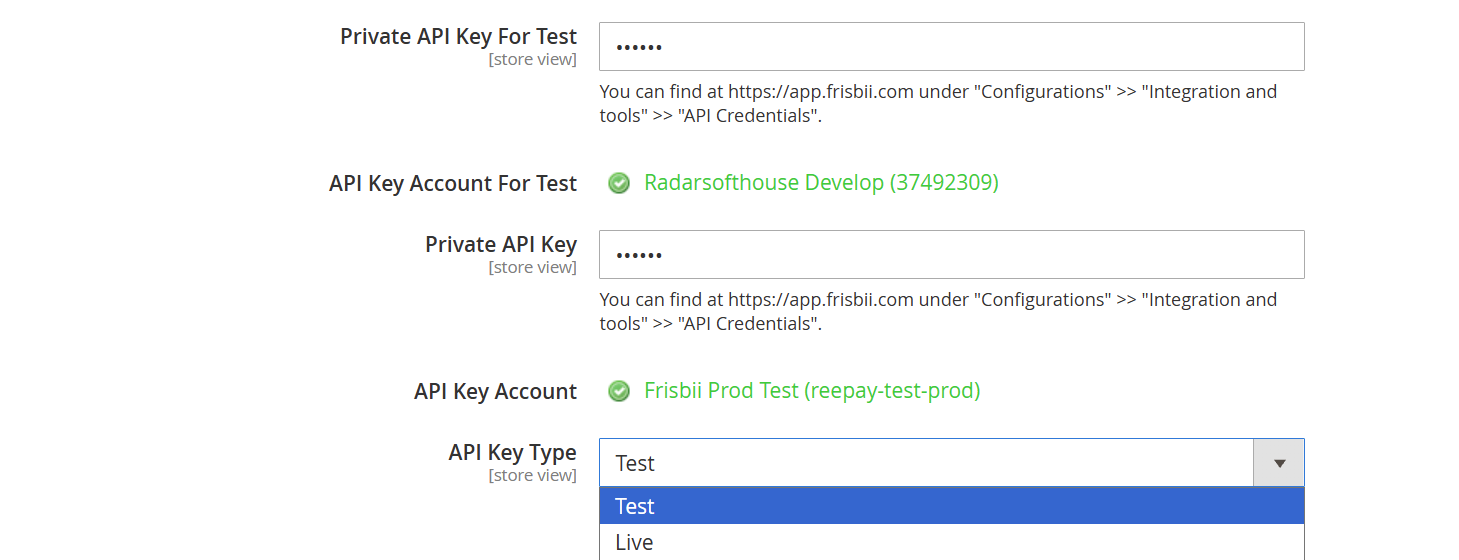
Which key is used?
The API Key Type setting decides which key the store uses. Choose Test for test payments or Live to take real payments.
Keys are set per store view
If you run several store views, update the key in each one that should use it.
Keep the old key until the new one works
Don’t delete the old key in Frisbii until you’ve saved the new one and the account name shows with a green check mark. Otherwise checkout may fail.
Supported versions
Magento 1 Current version: 1.0.26 Compatibility: Magento CE 1.7.x – 1.9.x
Magento 2 Current version: 1.0.8 Compatibility: Magento CE 2.1.x – 2.3.x