Overview
With Stripe SEPA, you collect SEPA Direct Debit payments through your own Stripe account. Your customers authorize a SEPA mandate on a Stripe page during checkout, and Frisbii stores the mandate so you can charge it for recurring payments and subscriptions.
You can connect your Stripe account to Frisbii in one of two ways:
Stripe Connect: You sign in to Stripe and authorize Frisbii. You don't need to copy or store any API keys.
Stripe API key: You copy a secret key from your Stripe Dashboard and enter it in Frisbii.
This guide walks you through both options, from preparing your Stripe account to offering Stripe SEPA in your checkout.
Limitations
Stripe SEPA currently supports storing a mandate only. You can use it in recurring and subscription checkout sessions, but not for one-off charges.
You can't change the connection method of a Stripe agreement after you have created it.
For mandates created in the checkout, the customer's BIC is not shown in Frisbii, because Stripe does not provide it. The last four digits of the IBAN are shown.
Note
Stripe SEPA is usually the fastest way to start with SEPA Direct Debit, because you don't need an EBICS connection to your bank or a separate PPRO contract. Stripe charges its own fees for SEPA Direct Debit, which are billed by Stripe. If you want to connect your own bank account directly, see Set up SEPA Direct Debit with EBICS in Frisbii.
Before you begin
You have an activated Stripe account that can accept live payments. If not, please register here: Create Stripe account
SEPA Direct Debit is enabled in your Stripe account. You can check this in the Stripe Dashboard under Settings → Payment methods.
You have access to the Frisbii Admin with permission to manage payment methods.
You have decided whether to connect via Stripe Connect or via an API key. You can't switch between the two later.
If you use an API key: you have access to the Developers area of your Stripe Dashboard.
Step 1: Open the Stripe SEPA payment method
Click Configuration in the left-hand menu.
Go to Checkout management.
Click Payment methods.
Scroll down to Bank Debits and Transfers.
Click SEPA Direct Debit.
Click Stripe SEPA.
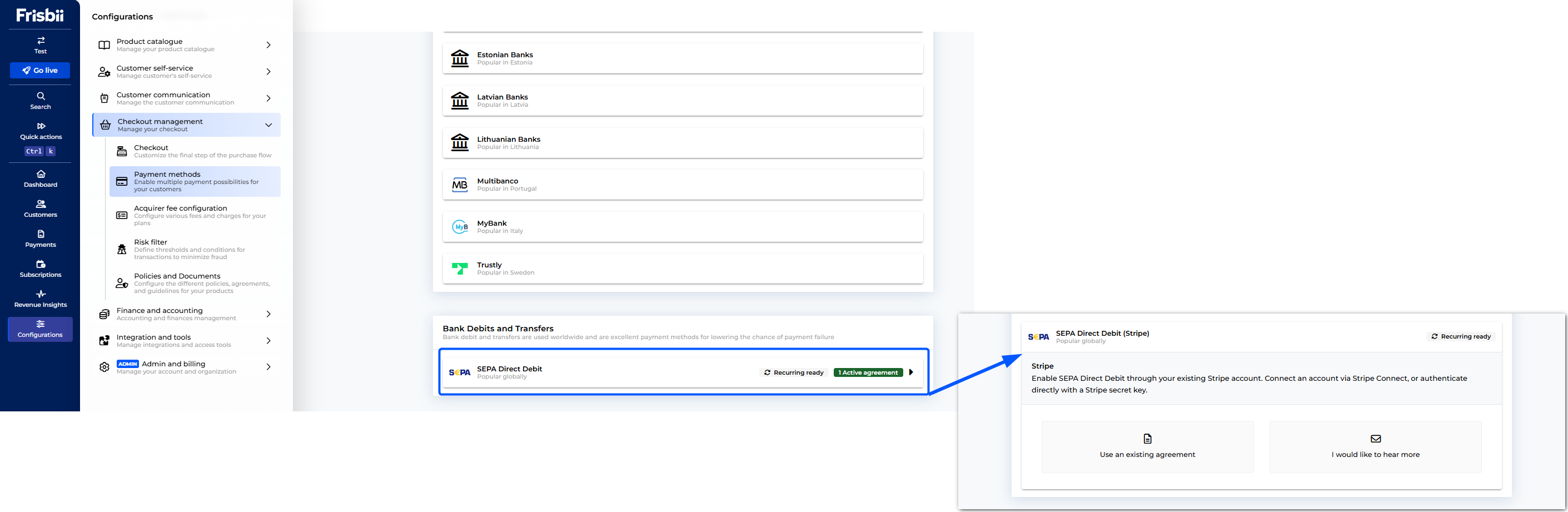
You now see the options for connecting your Stripe account. Continue with either Option A or Option B.
Option A: Connect via Stripe Connect
Use this option if you want Frisbii to connect to Stripe without handling API keys yourself.
Copy your account ID in Stripe
Sign in to your Stripe account.
If you manage several Stripe accounts, select the account you want to use for Frisbii.
In Stripe, go to Settings → Personal details. Scroll down to Accounts and copy your ID.
Enter the ID in Frisbii
Click SEPA Direct Debit (Stripe).
In the drop-down, select Connect.
Enter the ID in Frisbii.
Click Create.
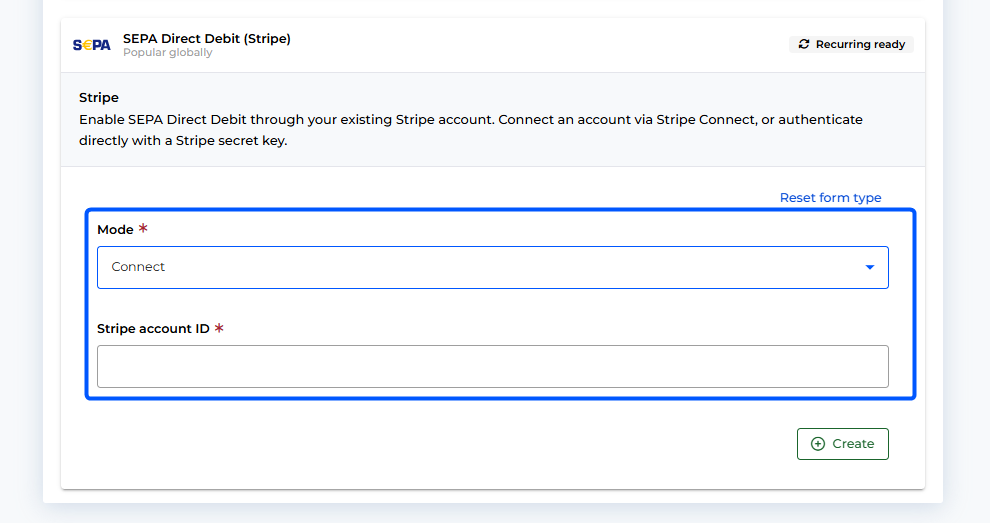
When the setup is complete, the Stripe SEPA agreement appears as active in the payment method list.
Option B: Connect with a Stripe API key
Use this option if you prefer to manage the connection with your own API key.
Copy your secret key in Stripe
Sign in to your Stripe Dashboard.
Go to Developers → API keys.
Copy your Secret key. A live secret key starts with
sk_live_, a test secret key withsk_test_.
Treat your secret key like a password. Don't share it by email or chat, and don't store it in unprotected files.
Enter the key in Frisbii
Click SEPA Direct Debit (Stripe).
In the drop-down, select Direct key.
Paste your secret key into the Secret key field.
Click Create.

When the setup is complete, the Stripe SEPA agreement appears as active in the payment method list. [VERIFY: what the merchant sees on success]
Step 2: Offer Stripe SEPA in your checkout
Go to Configuration → Checkout Management → Checkout.
Add SEPA Direct Debit to the payment methods of your checkout.
Save your changes.
Your customers now see Stripe SEPA as a payment option. When they select it, they are redirected to Stripe to authorize the SEPA mandate and then return to your checkout. If Stripe SEPA is the only payment method in the session, the redirect to Stripe happens automatically.
Test your setup
To test Stripe SEPA without collecting real money, set up the agreement on your Frisbii test account using a Stripe test key (sk_test_) or your Stripe test environment.
In the Stripe test environment, you can use the test IBAN DE89370400440532013000 to simulate a successful SEPA mandate. For more test IBANs, see the Stripe testing documentation.