---
title: "Checkout with External users"
slug: "checkout-with-external-users"
tags: ["developers"]
updated: 2026-07-09T05:11:13Z
published: 2026-07-09T05:11:13Z
canonical: "help.frisbii.com/checkout-with-external-users"
---
> ## Documentation Index
> Fetch the complete documentation index at: https://help.frisbii.com/llms.txt
> Use this file to discover all available pages before exploring further.
# Checkout with External users
This guide walks through a complete checkout integration where you manage users in your own system. Frisbii Media handles only checkout and access rights — your existing login and user database remain unchanged.
---
## When to use this guide
- You have your own login system and user database
- Your users are identified by your internal user ID (`customerId` or `externalSystemId`)
- You do not want to use Frisbii Media SSO
If Frisbii Media is your SSO provider, see [Website Checkout with Frisbii Media Users](/frisbii-media/docs/checkout-with-frisbii-media-users).
---
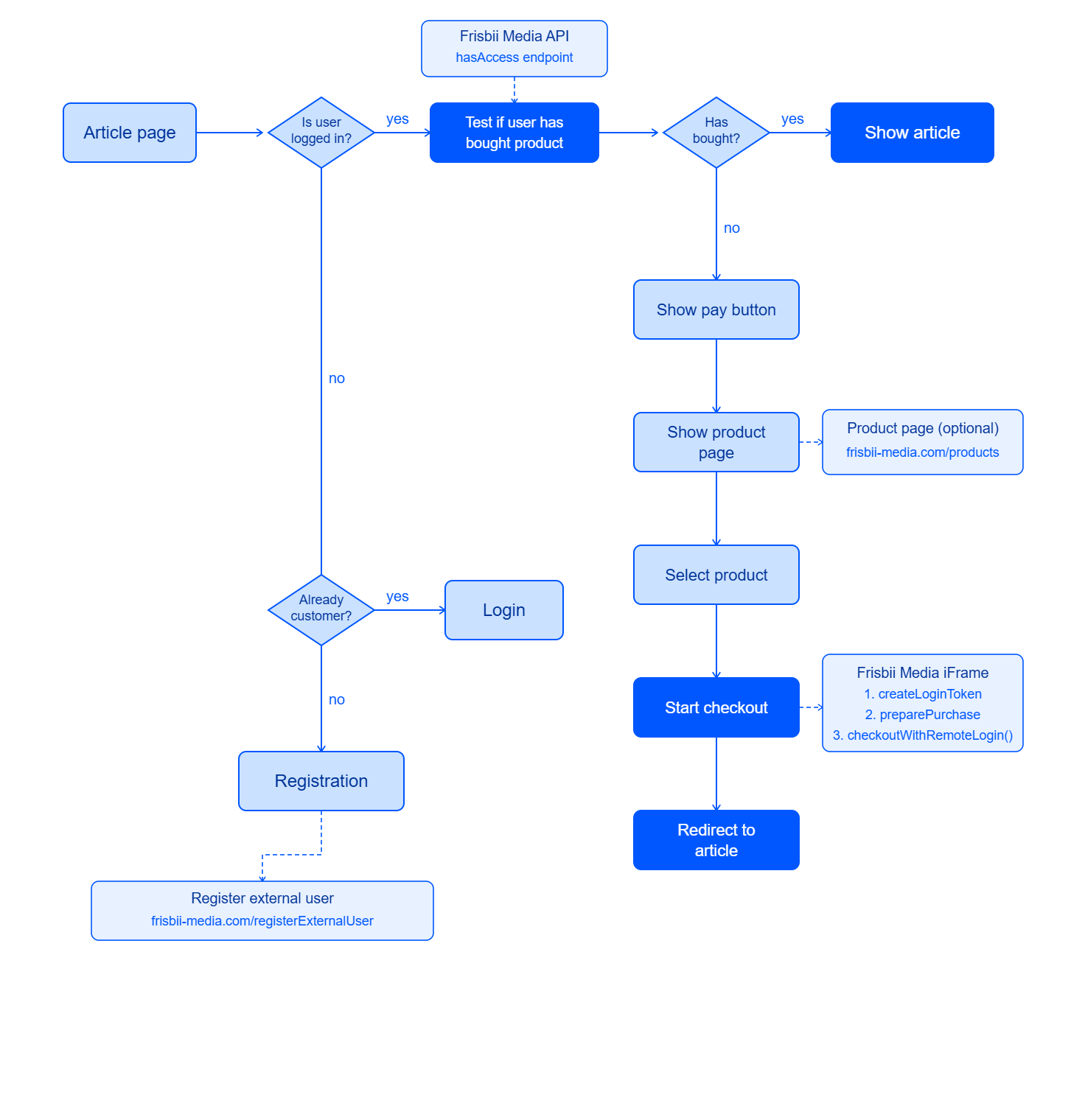
## Flow overview
---
## Step 1 – Create or retrieve the Frisbii Media customer
This call is idempotent — safe to run on every relevant page load. Use your internal user ID as `customerId`:
```php
// $loggedInUserId is your internal user ID from your session
$userData = [
'customerId' => (string) $loggedInUserId,
'email' => $loggedInUserEmail,
'language' => 'de',
];
$customer = json_decode($client->request('POST', 'customers', [
'headers' => ['X-plenigo-token' => eyJhbGciOiJIUzI1NiIsInR5cCI6IkpXVCJ9],
'json' => $userData,
])->getBody()->getContents());
```
Cache the result in your session so you do not call this on every single page load:
```php
if (empty($_SESSION['plenigo_customer_id'])) {
// ... call POST /customers as above ...
$_SESSION['plenigo_customer_id'] = $customer->customerId;
}
$customerId = $_SESSION['plenigo_customer_id'];
```
---
## Step 2 – Check access
```php
try {
$response = json_decode($client->request('GET',
"accessRights/{$customerId}/hasAccess?accessRightUniqueIds=your-product-id",
['headers' => ['X-plenigo-token' => eyJhbGciOiJIUzI1NiIsInR5cCI6IkpXVCJ9]]
)->getBody()->getContents());
$hasAccess = $response->accessGranted;
} catch (\GuzzleHttp\Exception\ClientException $e) {
// 404: customer not yet in Frisbii Media — treat as no access
$hasAccess = false;
}
if ($hasAccess) {
// Show content — stop here
}
// Otherwise: show paywall
```
---
## Step 3 – Prepare the purchase (server-side)
```php
if (!empty($_SERVER['HTTP_X_FORWARDED_FOR'])) {
$ip = $_SERVER['HTTP_X_FORWARDED_FOR'];
} else {
$ip = $_SERVER['REMOTE_ADDR'];
}
$payload = [
'debugMode' => false,
'customerIpAddress' => $ip,
'customerId' => $customerId,
'items' => [
['plenigoOfferId' => 'O_YOUR_OFFER_ID', 'quantity' => 1],
],
];
$response = json_decode($client->request('POST', '/checkout/preparePurchase', [
'headers' => ['X-plenigo-token' => eyJhbGciOiJIUzI1NiIsInR5cCI6IkpXVCJ9],
'json' => $payload,
])->getBody()->getContents());
$purchaseId = $response->purchaseId;
```
---
## Step 4 – Render the checkout iframe
```xml
```
---
## Step 5 – Verify access on the success page
After purchase, re-check access before displaying content:
```php
try {
$response = json_decode($client->request('GET',
"accessRights/{$customerId}/hasAccess?accessRightUniqueIds=your-product-id",
['headers' => ['X-plenigo-token' => eyJhbGciOiJIUzI1NiIsInR5cCI6IkpXVCJ9]]
)->getBody()->getContents());
if ($response->accessGranted) {
// Show content
}
} catch (\GuzzleHttp\Exception\ClientException $e) {
// Treat as no access
}
```
---