Overview
This module is an extension subject to a charge. To use PressMatrix, the module must first be activated in the contracting company.
PressMatrix is a technology provider that lets you turn print publications such as magazines, newspapers, or catalogs into digital products quickly and easily. You can provide your content as an ePaper on the web and in mobile apps, creating digital reading offers for your customers.
The integration of Frisbii Media with PressMatrix automates the exchange of access rights between both systems. Frisbii Media sends information about the respective access rights to PressMatrix, so customers automatically get access to the matching content and can read articles or publications.
The connection uses a standardized interface to the PressMatrix White Label solution. This means both systems can be connected without any additional programming effort.
Storing access rights in PressMatrix
Access rights are assigned using so-called external IDs within the respective PressMatrix publication.
Important notes
The unique IDs of the access rights from Frisbii Media are stored as external IDs in PressMatrix.
Multiple access rights can be assigned to one publication.
Multiple IDs are stored as a comma-separated list.
Example
12345,67890,ABCDE
In this example, users have access to the publication if they have at least one of the assigned access rights.
Benefits of the integration
By connecting Frisbii Media and PressMatrix, you benefit from:
easy provision of digital ePaper offers
automated control of access rights
fast integration without development effort
flexible product and offer variants
centrally managed permissions for digital content
This lets you manage digital publications efficiently and integrate them seamlessly into existing subscription and paywall models.
Configuration in the Frisbii Merchant Backend
Activate the partner module
Administrator rights are required!
In the contracting company, open Contract Modules.
Activate the PressMatrix module.
Generate a Partner Token
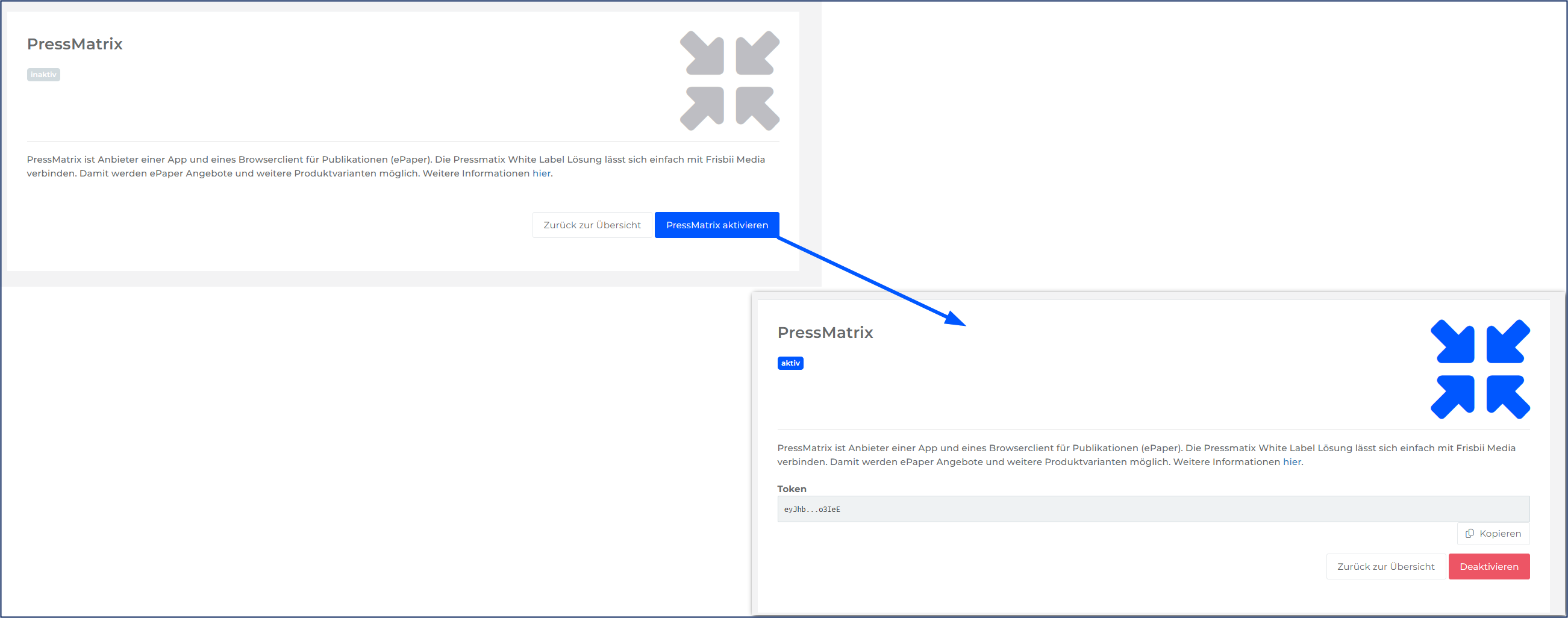
In the client, open Settings → Development → Partner Settings.
Click Activate PressMatrix.
Save the token.
Information required by PressMatrix
PressMatrix needs the following data from Frisbii Media:
Environment: STAGE (for testing) or LIVE (for production)
Company ID (client)
Click the support button in the top right corner of the interface. Copy the client ID.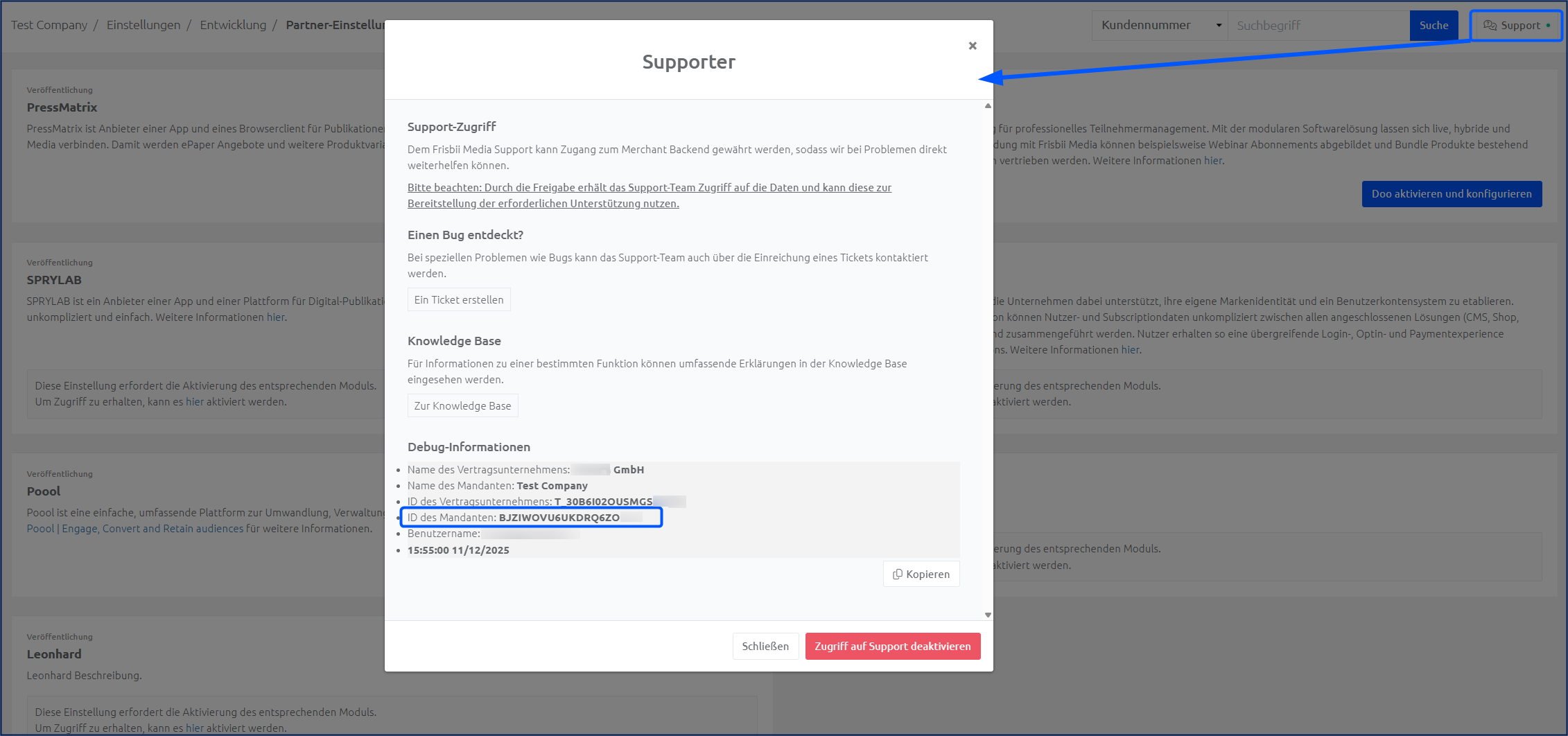
Partner Token
The token created in Settings → Development → Partner Settings.Unique IDs of the access rights
The unique IDs of the access rights are stored as external IDs in the respective PressMatrix publications:Multiple access rights can be assigned per publication
Format: comma-separated list of unique IDs
👩💻 Partner APIYou can retrieve the unique IDs with our Partner API.
Implementation process
1 Set up the STAGE environment
Once you have collected all the data, contact PressMatrix Support (unless you have a central contact person) and request the Frisbii Media connection. The following data must be sent to PressMatrix:
Partner Token
Unique IDs of the access rights
Company ID of the STAGE and LIVE environment
2 Testing
After the test kiosk has been set up or switched over, a full test phase follows.
3 Set up the LIVE environment
After successful testing, the LIVE environment is configured in the same way as the STAGE environment.
Important: Inform PressMatrix Support of the go-live date so that the interface is activated at the right time.
Customer migration
Important note
If there are PressMatrix in-app-only customers who are not recorded in any existing system (e.g. COVER, SAP), these customers must be migrated to Frisbii separately. Otherwise, their purchases and subscriptions will be lost.
Solution: Request a customer data export from your contact person at Frisbii Media and carry out the migration.
Special considerations for shop integration
Single-issue sales via skeleton products
For single-issue sales via skeleton products from the shop, the following applies:
An external product ID is stored on the access right
PressMatrix checks both the product ID and the unique ID of the access right
If the product ID does not follow the plenigo logic, the check fails
Consequence: The customer does not get access despite having the correct access right.
Solution
In PressMatrix, both IDs must be maintained as external IDs on the publications:
Access right unique ID
Shopware product ID
Note: The Shopware product IDs are unique per single product.