B.260812-MINOR
🔧 Improved
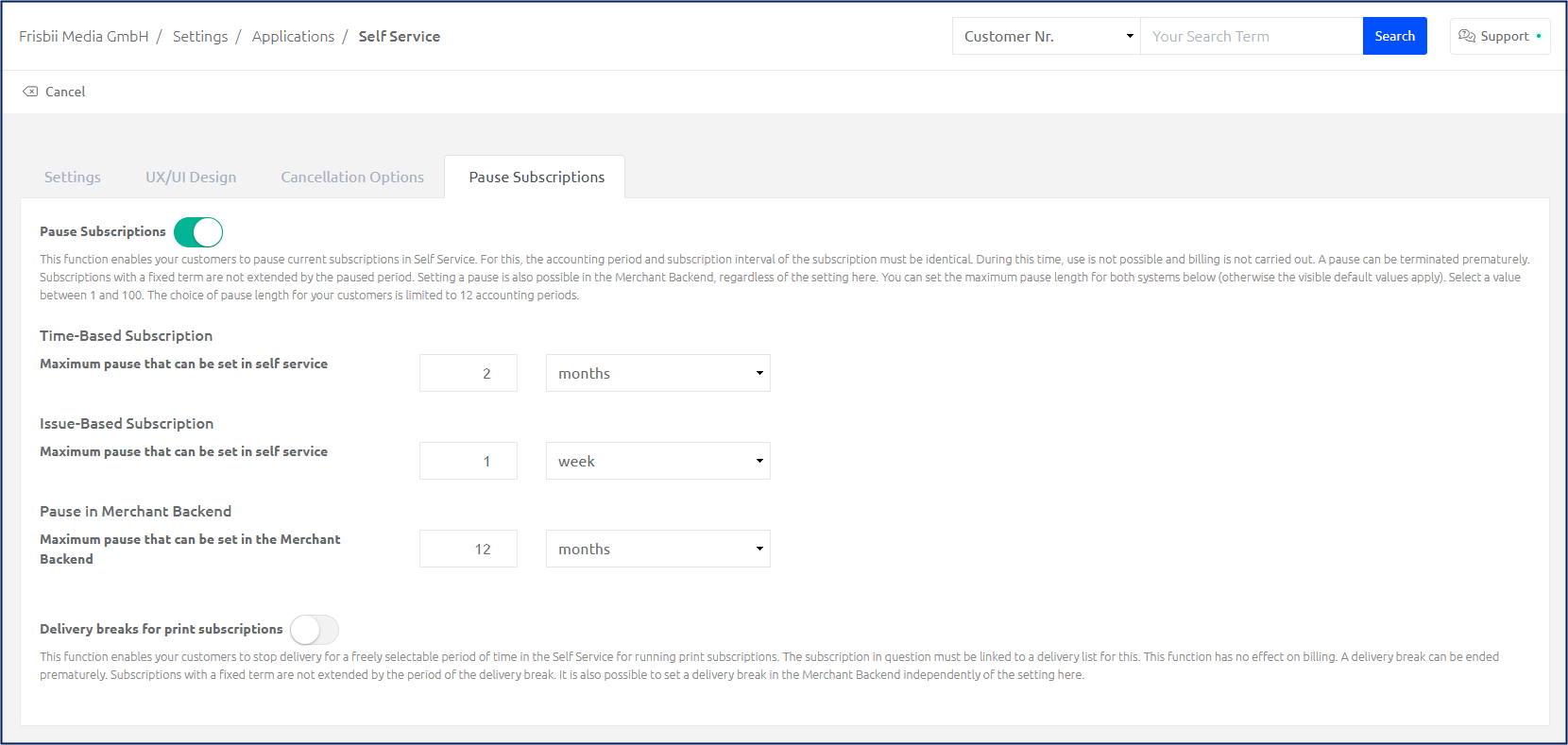
Customizable pause settings
Separate maximum pause durations can now be set for time-based and issue-based subscriptions, for both the self-service portal and the Merchant Backend. You can define these durations in days, weeks, months, or years. For example, you can grant customers with a time-based subscription a longer pause period than customers with issue-based subscriptions. In addition, you can give your support agents a longer allowable pause period, so they can pause a customer's subscription as a goodwill gesture when needed.
New SEPA error messages added
With API.260812-MINOR we have added more SEPA error messages which will be displayed in Frisbii Media’s Transaction Log in case of failed payment.
Find all SEPA error messages and what to to here:
Failure code | Explanation | Next steps |
|---|---|---|
| The transaction can’t be processed because the IBAN that your customer provided is incorrect. | Contact your customer for correct account details, then retry the transaction. |
| The payment can’t be processed because your customer’s bank account is closed. | Contact your customer for new account details, then retry the transaction. |
| Stripe can’t identify a specific reason for the payment failure. | Contact Support for more information. |
| The payment process can’t be completed because your customer’s bank account lacks the necessary funds. | Contact your customer to verify that they have the required funds, then retry the transaction. |
| The payment doesn’t have an authorised mandate. | Collect a new mandate, then retry the transaction. |
| The transaction can’t be processed due to missing or incorrect mandate information. | Collect a new mandate from your customer, then retry the transaction. |
| Your customer requested that their bank refund this payment. | Contact your customer to resolve any dispute, then retry the transaction. |
| The mandate was set up on the account of a potentially deceased individual. | Verify your customer’s status before retrying the transaction. |
| The payment can’t be processed because the bank branch associated with your customer’s IBAN doesn’t exist. | Contact your customer to provide new account details, then retry the transaction. |
| The transaction can’t be processed because your customer’s account information is missing or incorrect. | Collect a new mandate and ask your customer to provide their name and address exactly as it appears on their bank account. Then, retry the transaction. |
| We don’t have detailed information about the payment failure because your customer’s bank didn’t provide a reason code. | Contact your customer for more information. |
🐛 Bug Fixes
PLEN-11399: The delivery log in the subscription view could fail to display if a stored delivery address could no longer be found. The delivery log now displays correctly in this case and marks the affected address as "deleted."
S.260812-MINOR
🐛 Bug Fixes
PLEN-11451: The self-service portal had several accessibility issues, including missing labels, unclear error messages, and unmarked required fields. These issues have been fixed: screen readers and password managers now work correctly, and required fields are clearly marked.
PLEN-11115: In certain cases involving an age-based rule on the offer, the user management area of the self-service portal sometimes displayed the wrong multi-user subscription as active. The actually active subscription is now displayed reliably.
C.260812-MINOR
🔧 Improved
Checkout tracking now reports failed payment attempts
Until now a failed payment was not visible in the checkout tracking data. From a tracking point of view, a customer switching the payment method and a customer entering a wrong IBAN looked nearly the same. The checkout tracking data now reports whether the page a customer sees is the result of a failed action, together with the cause of that failure:
failed- true if the page is the result of a failed action, otherwise falsefailureType- the cause of the failure:USER_ERROR- caused by the customer and usually correctable, e.g. a declined card, a wrong IBAN, or an abort at the payment providerCONFIGURATION_ERROR- caused by the merchant configurationTECHNICAL_ERROR- caused by Frisbii Media or the payment service providerUNKNOWN- a failure happened, but the cause cannot be determinedNONE- no failure
errorCode- the API error code of the failure, 0 if unknown
The new values are available in the WebAnalyticsLoad event and in the action / Statistic tracking payload, and additionally as data-failed, data-failure-type and data-error-code attributes on the checkout body element. No action is required. Existing tracking callbacks and events keep working unchanged - the new values are added on top. Applies to the V3 checkout.