This guide walks through a complete checkout integration where you manage users in your own system. Frisbii Media handles only checkout and access rights — your existing login and user database remain unchanged.
When to use this guide
You have your own login system and user database
Your users are identified by your internal user ID (
customerIdorexternalSystemId)You do not want to use Frisbii Media SSO
If Frisbii Media is your SSO provider, see Website Checkout with Frisbii Media Users.
Flow overview
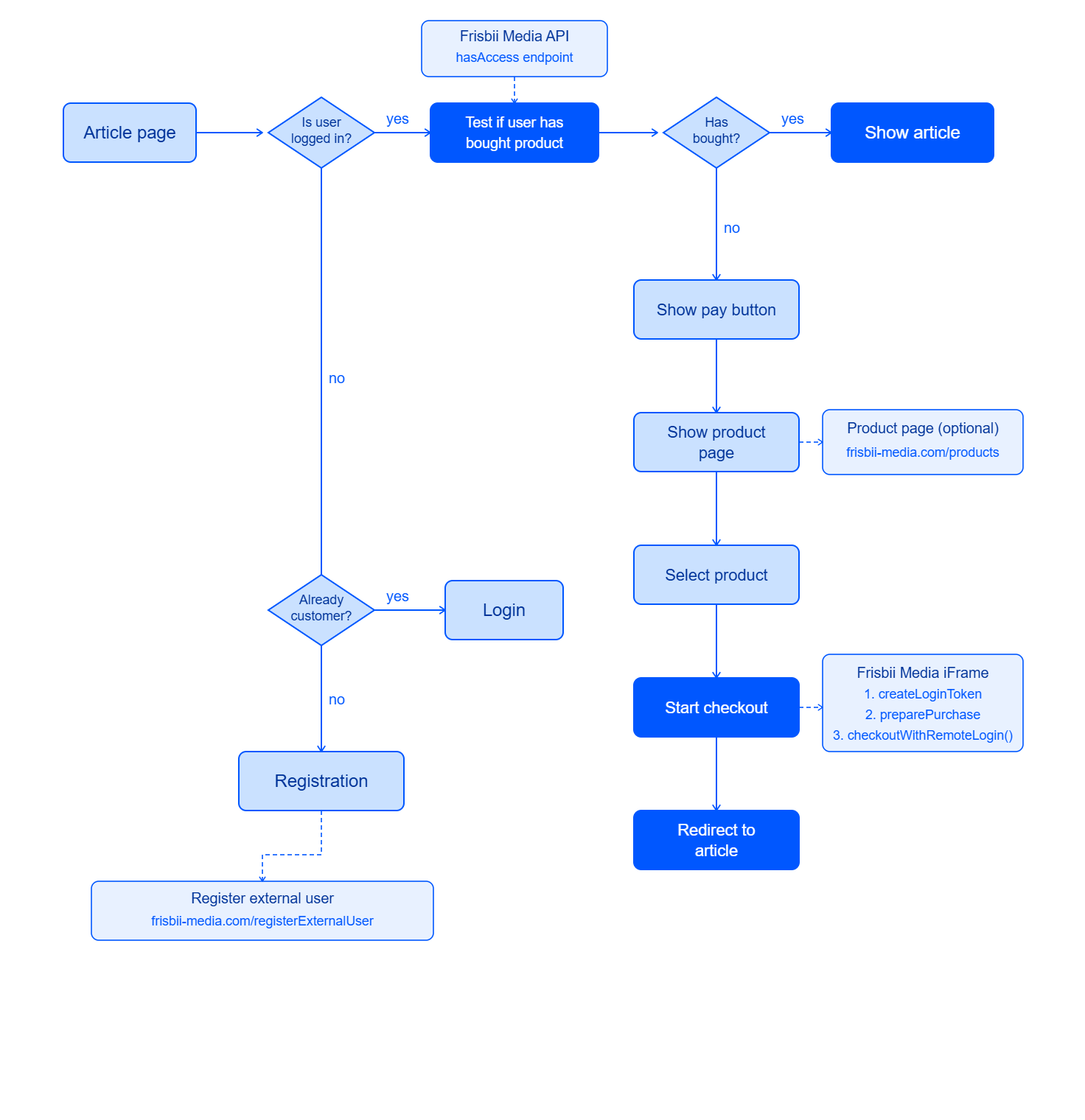
Step 1 – Create or retrieve the Frisbii Media customer
This call is idempotent — safe to run on every relevant page load. Use your internal user ID as customerId:
// $loggedInUserId is your internal user ID from your session
$userData = [
    'customerId' => (string) $loggedInUserId,
    'email'      => $loggedInUserEmail,
    'language'   => 'de',
];
$customer = json_decode($client->request('POST', 'customers', [
    'headers' => ['X-plenigo-token' => eyJhbGciOiJIUzI1NiIsInR5cCI6IkpXVCJ9],
    'json'    => $userData,
])->getBody()->getContents());
Cache the result in your session so you do not call this on every single page load:
if (empty($_SESSION['plenigo_customer_id'])) {
    // ... call POST /customers as above ...
    $_SESSION['plenigo_customer_id'] = $customer->customerId;
}
$customerId = $_SESSION['plenigo_customer_id'];
Step 2 – Check access
try {
    $response = json_decode($client->request('GET',
        "accessRights/{$customerId}/hasAccess?accessRightUniqueIds=your-product-id",
        ['headers' => ['X-plenigo-token' => eyJhbGciOiJIUzI1NiIsInR5cCI6IkpXVCJ9]]
    )->getBody()->getContents());
    $hasAccess = $response->accessGranted;
} catch (\GuzzleHttp\Exception\ClientException $e) {
    // 404: customer not yet in Frisbii Media — treat as no access
    $hasAccess = false;
}
if ($hasAccess) {
    // Show content — stop here
}
// Otherwise: show paywall
Step 3 – Prepare the purchase (server-side)
if (!empty($_SERVER['HTTP_X_FORWARDED_FOR'])) {
    $ip = $_SERVER['HTTP_X_FORWARDED_FOR'];
} else {
    $ip = $_SERVER['REMOTE_ADDR'];
}
$payload = [
    'debugMode'         => false,
    'customerIpAddress' => $ip,
    'customerId'        => $customerId,
    'items'             => [
        ['plenigoOfferId' => 'O_YOUR_OFFER_ID', 'quantity' => 1],
    ],
];
$response = json_decode($client->request('POST', '/checkout/preparePurchase', [
    'headers' => ['X-plenigo-token' => eyJhbGciOiJIUzI1NiIsInR5cCI6IkpXVCJ9],
    'json'    => $payload,
])->getBody()->getContents());
$purchaseId = $response->purchaseId;
Step 4 – Render the checkout iframe
<div id="plenigoCheckout"></div>
<script src="https://static.frisbii-media.com/web/v1/frisbii_media.min.js"
        data-company-id="{YourCompanyId}"
        data-lang="en"></script>
<script>
    new plenigo.Checkout("<?php echo $purchaseId; ?>", {
        elementId: "plenigoCheckout"
    }).start();
    document.addEventListener("plenigo.PurchaseSuccess", function(e) {
        if (e.type !== "plenigo.PurchaseSuccess") return false;
        var orderId = parseInt(e.detail.orderId);
        if (orderId > 0) {
            location.href = "/success/?order=" + orderId;
        } else {
            // orderId -1: customer already owns this product
            location.href ="/already-subscribed/";
        }
    });
    document.addEventListener("plenigo.PurchaseFailed", function(e) {
        if (e.type !== "plenigo.PurchaseFailed") return false;
        location.href = "/checkout-failed/";
    });
</script>
Step 5 – Verify access on the success page
After purchase, re-check access before displaying content:
try {
    $response = json_decode($client->request('GET',
        "accessRights/{$customerId}/hasAccess?accessRightUniqueIds=your-product-id",
        ['headers' => ['X-plenigo-token' => eyJhbGciOiJIUzI1NiIsInR5cCI6IkpXVCJ9]]
    )->getBody()->getContents());
    if ($response->accessGranted) {
        // Show content
    }
} catch (\GuzzleHttp\Exception\ClientException $e) {
    // Treat as no access
}