An ID system provides a single login point for multiple websites — even across different domains. Frisbii Media SSO and transfer tokens make this possible without sharing session cookies or secrets between domains.
This guide is relevant if you run multiple publications or websites and want a single user account to work across all of them.
Architecture
One central identity website (the "ID system") handles all Frisbii Media logins. Other websites never communicate directly with Frisbii Media SSO — they receive a short-lived transfer token from the ID system and exchange it for a local session.
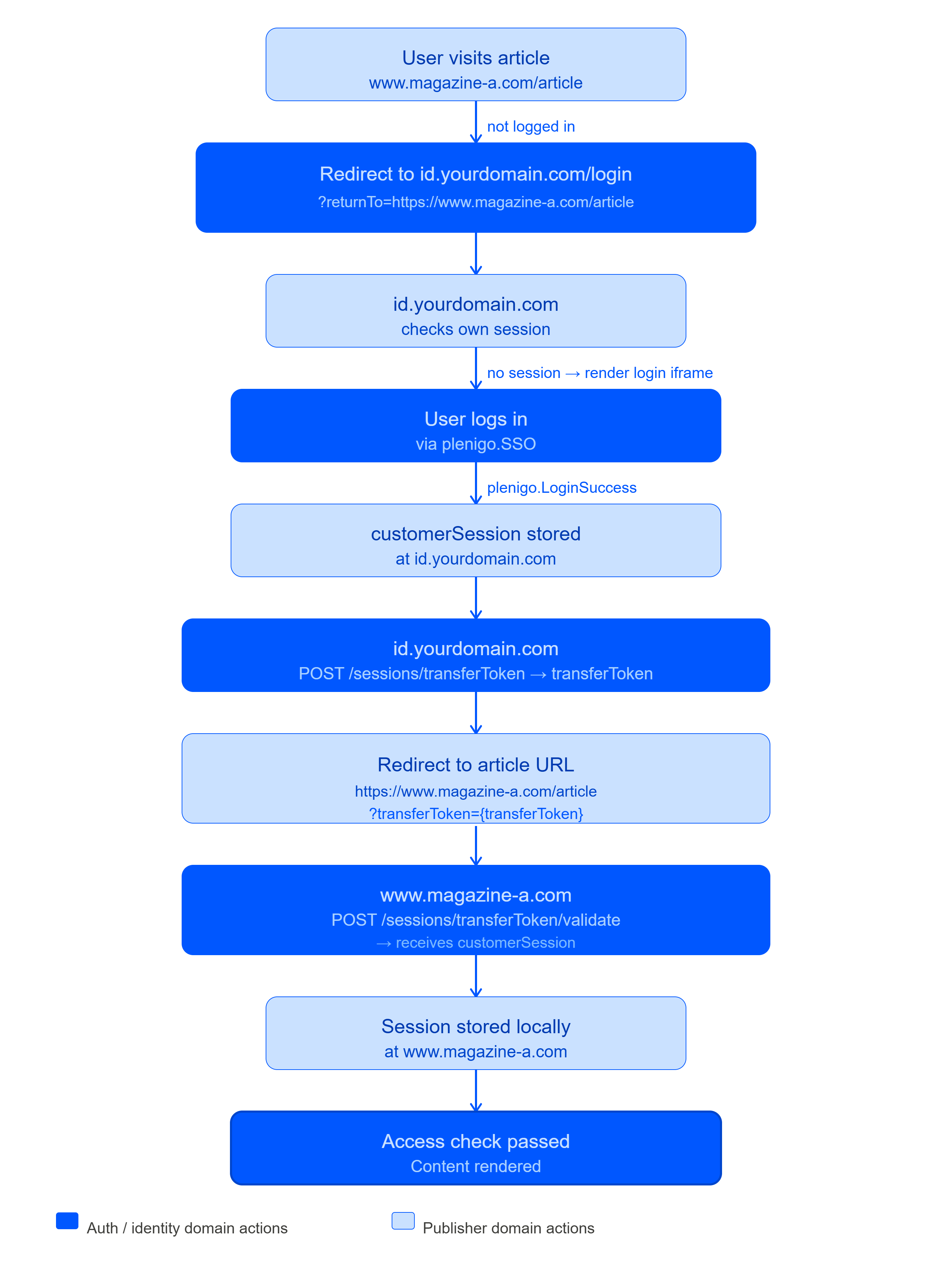
If the user already has a session at id.yourdomain.com, the redirect is transparent — no login prompt.
ID system implementation
1 – Handle the login and store the session
// id.yourdomain.com/login
$returnTo = $_GET['returnTo'] ?? '/'; // the URL to redirect back to
// Check for existing session
if (!empty($_SESSION['plenigo_customer_session'])) {
    // Already logged in — skip to transfer token creation
    header('Location: /create-transfer-token?returnTo=' . urlencode($returnTo));
    exit;
}
<!-- Show the Frisbii Media login iframe -->
<div id="plenigoLogin"></div>
<script src="https://static.frisbii-media.com/web/v1/frisbii_media.min.js"
        data-company-id="{your_companyId}"
        data-lang="en"></script>
<script>
    var returnTo = "<?php echo htmlspecialchars($returnTo); ?>";
    document.addEventListener("plenigo.LoginSuccess", function(e) {
        if (e.type !== "plenigo.LoginSuccess") return false;
        // Send session to backend
        fetch('/store-session-and-redirect', {
            method: 'POST',
            headers: { 'Content-Type': 'application/json' },
            body: JSON.stringify({
                customerSession: e.detail.customerSession,
                returnTo: returnTo
            })
        }).then(function(res) { return res.json(); })
          .then(function(data) { location.href = data.redirectUrl; });
    });
    new plenigo.SSO({ elementId: "plenigoLogin" }).login();
</script>
2 – Create the transfer token and redirect
// POST /store-session-and-redirect
$data    = json_decode(file_get_contents('php://input'), true);
$session = $data['customerSession'];
$returnTo = $data['returnTo'];
$_SESSION['plenigo_customer_session'] = $session;
// Create transfer token
// @see https://api.frisbii-media.com/#tag/Sessions/operation/createTransferToken
$response = json_decode($client->request('POST', '/sessions/transferToken', [
    'headers' => ['X-plenigo-token' => eyJhbGciOiJIUzI1NiIsInR5cCI6IkpXVCJ9],
    'json'    => ['customerSession' => $session],
])->getBody()->getContents());
$transferToken = $response->transferToken;
// Append the transfer token to the return URL
$separator   = str_contains($returnTo, '?') ? '&' : '?';
$redirectUrl = $returnTo . $separator . 'transferToken=' . urlencode($transferToken);
echo json_encode(['redirectUrl' => $redirectUrl]);
Target website implementation (magazine-a.com)
Validate the transfer token on arrival
// Any page that may receive a transferToken query parameter
if (!empty($_GET['transferToken']) && empty($_SESSION['plenigo_customer_session'])) {
    // @see https://api.frisbii-media.com/#tag/Sessions/operation/validateTransferToken
    try {
        $response = json_decode($client->request('POST', '/sessions/transferToken/validate', [
            'headers' => ['X-plenigo-token' => eyJhbGciOiJIUzI1NiIsInR5cCI6IkpXVCJ9],
            'json'    => ['transferToken' => $_GET['transferToken']],
        ])->getBody()->getContents());
        $_SESSION['plenigo_customer_session'] = $response->customerSession;
    } catch (\GuzzleHttp\Exception\ClientException $e) {
        // Token invalid or expired — redirect to ID system for fresh login
        $loginUrl = 'https://id.yourdomain.com/login?returnTo=' . urlencode($_SERVER['REQUEST_URI']);
        header('Location: ' . $loginUrl);
        exit;
    }
}
// Remove transferToken from the URL to avoid re-use on page refresh
if (!empty($_GET['transferToken'])) {
    // Redirect to clean URL (without transferToken parameter)
    $cleanUrl = strtok($_SERVER['REQUEST_URI'], '?');
    header('Location: ' . $cleanUrl);
    exit;
}
Check access and run checkout
Once the session is stored, use it exactly as in the Website Checkout with Frisbii Media Users guide — preparePurchase with customerSession, access checks via the Customer API, and so on.
Key design principles
Principle | Why |
|---|---|
Transfer tokens are single-use | Each redirect gets a fresh token. Reusing a token will return an error. |
Transfer tokens are short-lived | Generate one immediately before the redirect. Do not store and reuse them. |
Session strings stay server-side | Never put the |
ID system is the only SSO entry point | Other websites never render a Frisbii Media login iframe — they always redirect to the ID system. |
Self-service portal on the ID system
Since the ID system is the only place with the customer session, embed the Frisbii Media self-service portal there too. Create a transfer token from the session and start Snippets:
$response = json_decode($client->request('POST', '/sessions/transferToken', [
    'headers' => ['X-plenigo-token' => eyJhbGciOiJIUzI1NiIsInR5cCI6IkpXVCJ9],
    'json'    => ['customerSession' => $_SESSION['plenigo_customer_session']],
])->getBody()->getContents());
$transferToken = $response->transferToken;
<div id="plenigoSnippets"></div>
<script>
    new plenigo.Snippets("<?php echo $transferToken; ?>", {
        elementId: "plenigoSnippets"
    }).start();
</script>